For 1099 and self-employed work · Windows & macOS

Got a 1099?
Your deductions are already inside.

PrivateBooks turns your bank and credit-card statements into tax-ready books — pre-loaded with the write-offs people in your line of work actually claim. It runs entirely on your own computer. No account, no cloud, no bank login, nothing uploaded.

No sign-up — there's no account to make. Open it and you're working in under a minute.

The PrivateBooks tax-readiness checklist showing how close your books are to being ready for tax time
0
bytes sent to the cloud
8
professions with deductions pre-loaded
578
built-in sorting rules
once
you pay — no subscription

Why PrivateBooks exists

Your finances shouldn't have to leave your desk
just to get done.

Most bookkeeping apps ask for your bank logins and ship every transaction to a company's servers. PrivateBooks doesn't. It's an ordinary app on your computer that stores everything in one local file and never makes a single network call. Your numbers stay yours — we couldn't see them if we tried.

No account to create No cloud, no sync No bank login — you upload files yourself Nothing ever sent to us

How it works

Tax-ready in four steps.

Built for business owners, not accountants. No jargon, no blank chart of accounts.

What kind of work do you do?

Driver, delivery, freelancer, creator, cleaner, handyman, tutor, pet sitter — pick yours and answer three plain questions. PrivateBooks sets your books up pre-loaded with the deduction categories people in your line of work actually claim, each mapped to its real Schedule C line.

No tax research required.
Guided setup asking what kind of work you do

Drop in your statements.

Download a CSV or PDF from your bank — the same file you'd download anyway — and open it. PrivateBooks reads the columns automatically, handles US and European number formats, and skips anything you've already imported, so re-importing is always safe.

CSV or PDF, any common layout.
Import screen for uploading a bank statement file

Confirm — in plain English.

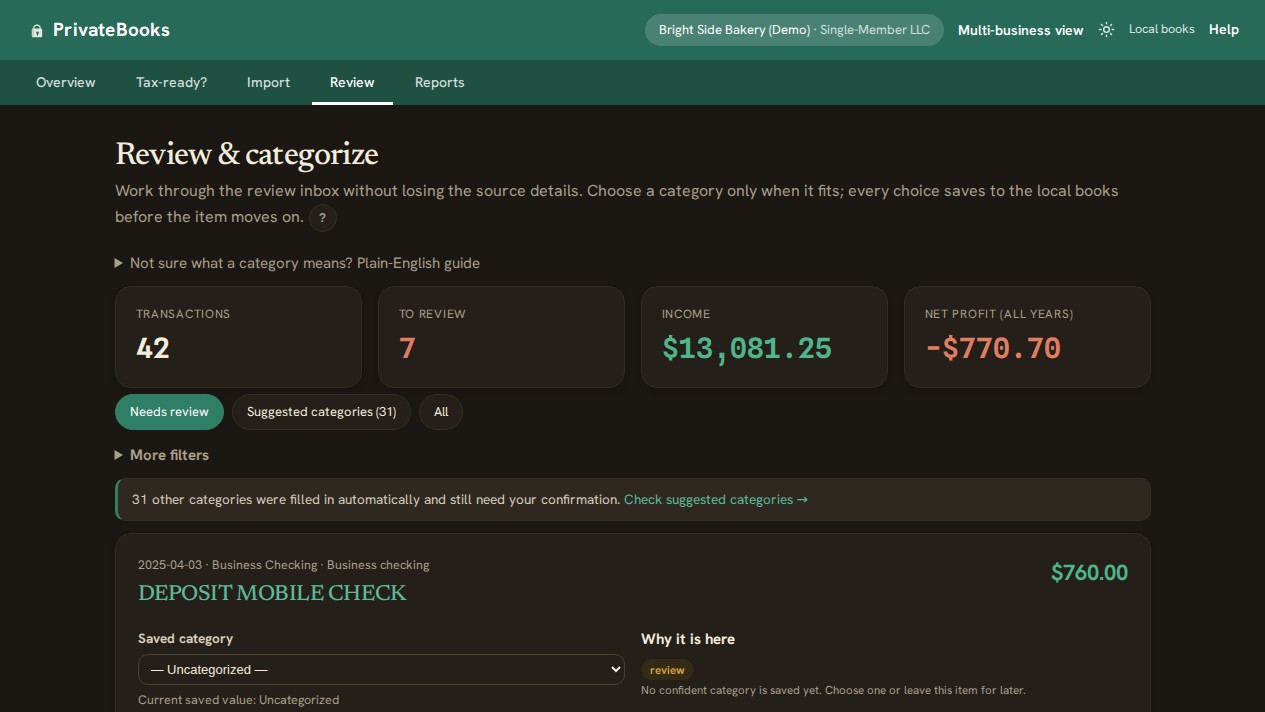
Everything is sorted already. You only check the few it wasn't sure about. Teach it a merchant once and it remembers forever; transfers between your own accounts are matched and kept out of your totals so the same dollar is never counted twice.

Teach it once, it remembers.
Review screen showing transactions sorted into categories

Hand off tax-ready books.

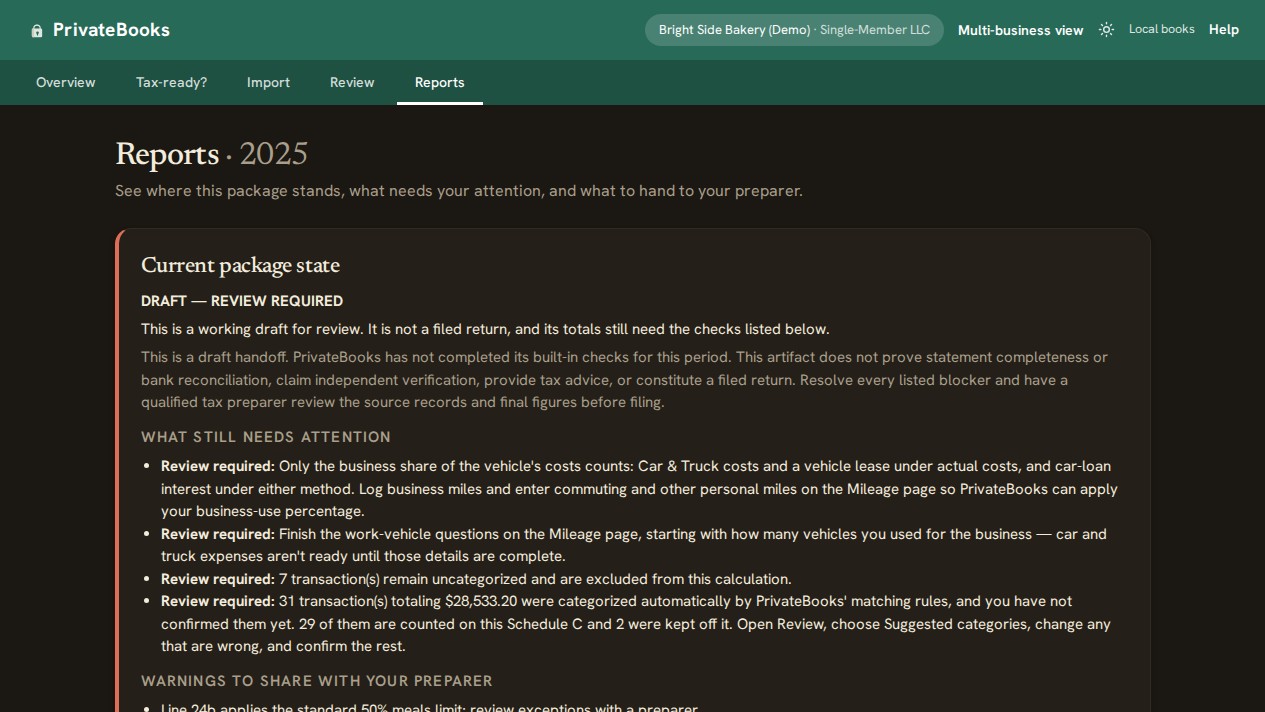
A Profit & Loss and a Schedule C summary where every line maps to a real line on the IRS form — ready for your preparer to copy straight across. Download the whole package as a spreadsheet bundle or a clean PDF.

Schedule C is the verified workflow.
Reports screen with a Profit and Loss and a Schedule C tax summary

Everything you need at tax time

Small, simple, and surprisingly complete.

“Am I tax-ready?”

A plain checklist tells you exactly what's left before your books are ready to hand off — no guessing.

Reports that make sense

Profit & loss, a cash-flow chart, your top vendors, and recurring subscriptions you forgot you're paying for.

Mileage & home office

Log business trips and your home-office square footage; PrivateBooks estimates the deduction using IRS rates.

The platform's cut

Rover, Wyzant and the rest keep their fee before you ever see the money. Book the gross and the fee separately, so you don't pay tax on income you never received.

Split a charge

One purchase that was part business, part personal? Split it across categories — the parts always add up exactly.

Lock a filed year

Close a tax year and PrivateBooks protects it, so a stray edit or re-import can't change a number you already filed on.

Back up & restore

Your books are one file you own. Back it up, move it to a new computer, and pick up exactly where you left off.

Answers where you need them

A “?” next to anything unfamiliar opens a plain-English explanation, and the full help centre works offline like everything else.

See the shape of your year

Where your money came from — and went.

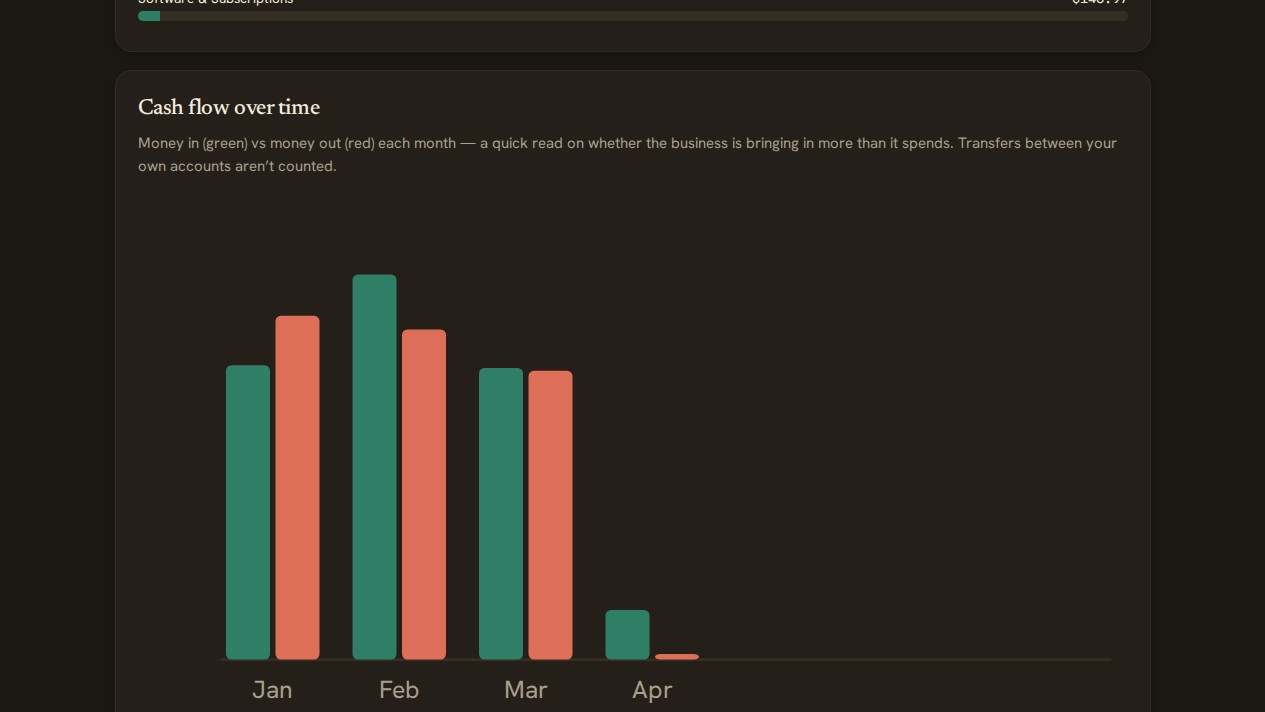
A clean cash-flow chart shows money in versus money out, month by month, so you can see at a glance whether the business is bringing in more than it spends. Transfers between your own accounts don't muddy the picture.

Monthly cash-flow chart of money in versus money out

One charge, more than one thing

Split a purchase in seconds.

Bought supplies and something personal on the same receipt? Divide the charge into parts, each with its own category. PrivateBooks keeps the original for your records and makes sure the parts add up to the penny.

Splitting one transaction into multiple categories

No accounting degree required

Answers right where you need them.

A little “?” next to anything unfamiliar opens a plain-English explanation, and a full help centre is one click away — written for business owners, not accountants. It works offline, like everything else.

The in-app help and FAQ page

Pricing

Pay once. That's the whole model.

You're already paying subscriptions for things that used to be one-off purchases. Bookkeeping shouldn't be another one.

$49.99 once
One payment. No subscription, no per-transaction fee, no license key.
  • Every v4 update included
  • Unlimited businesses, accounts & transactions
  • Every feature — nothing behind a “Pro” tier
  • Your data stays on your computer, always
See your options

Coming to the Microsoft Store for Windows. A free, unsupported legacy edition (v3.4.2, macOS) stays available in the meantime.

Questions

Good to know.

What does it cost?
$49.99 once, for Windows through the Microsoft Store — no subscription, no per-transaction fee, and every v4 update included. A free, unsupported legacy edition (v3.4.2, macOS) remains available for download.
Where does my data live — does anything go to the cloud?
Everything stays on your computer, in one local file. There's no cloud, no sync, and the app makes no network calls at all — so nothing is ever uploaded, and we never see your numbers.
Do I have to connect my bank or enter a login?
No. PrivateBooks can't log into your bank and never asks for a username or password. You download a statement file (CSV or PDF) from your bank yourself — the same one you'd download anyway — and open it.
Do I need to know accounting?
Not at all. Guided setup asks what kind of work you do and pre-loads the deductions people in that line of work claim. Everything is explained in plain English, with a “?” next to anything unfamiliar.
I got a 1099 and never tracked anything. Is it too late?
No. Statements are the record — import the year, confirm the handful of transactions PrivateBooks wasn't sure about, and you have books. If you drove, your platform's year-end tax summary lists your online miles, so you can start from those.
What do I hand my accountant?
A Profit & Loss and a tax-form summary — Schedule C for sole props and single-member LLCs — as a spreadsheet bundle or a clean PDF. Every line maps to the real form so your preparer can copy it straight across.
Which computers does it run on?
Windows 10 22H2 or Windows 11 for the Store edition. The free legacy edition is macOS. Both are self-contained — nothing else to install — and both work completely offline.
Is this tax advice?
No. PrivateBooks organizes your books and flags what needs attention; every figure is an estimate to confirm with your tax preparer. Always review with your preparer before filing.

Read the full FAQ →

Ready when you are

Get your books ready for tax time — privately.

Open it and you're working in under a minute. No account, no bank login, nothing to upload. Your bookkeeping stays exactly where it belongs: with you.

PrivateBooks produces a bookkeeping summary to assist tax preparation. It is not tax advice — review with your tax preparer before filing.